
The Route Through a Georgia Property Search
County routing comes first in Georgia. Choose it by the situs address, the land's true location. A postal city and ZIP can cross county lines. The Department of Revenue's county directory leads to each local assessor system. Search the address there. You get the owner label, parcel ID, legal description, and map link. That is a firm local key, not a guess built from a street name alone.
Next, use the parcel ID to confirm the map. Then carry the owner or legal description toward the record that answers your question. The statewide GSCCCA Real Estate Index organizes searches by party, county, instrument type, date, and book/page. The tax commissioner holds the bill and payment trail. Keep the order straight. Locate the land, confirm the parcel, then follow the record type you actually need.
- Enter the address in the assessor portal for the county where the land sits.
- Save the exact parcel ID, owner field, situs and mailing addresses, legal description, and data year.
- Use the county map to check that the selected parcel matches the address and surrounding roads.
- Use the parcel and legal description to reach the right deed, tax, or permit record.
- Ask the custodian for the official copy or any record not published online.
Georgia Property Search Starts With County Routing
The Georgia Department of Revenue links out to county assessor and property-record systems. It is a directory, not a statewide parcel database. DOR states it does not maintain or guarantee the local sites. County platforms vary widely. Many run on QPublic, while others use their own systems or different vendors. Some counties post a full property card online. Others ask for an office visit or a records request.
Start from the state's Property Records Online directory. Then check that the portal matches your chosen county. Keep the county name beside the address and parcel ID, especially where metro boundaries blur. If a link fails, DOR's County Property Tax Facts map can help. It points you to the local official and a contact route.
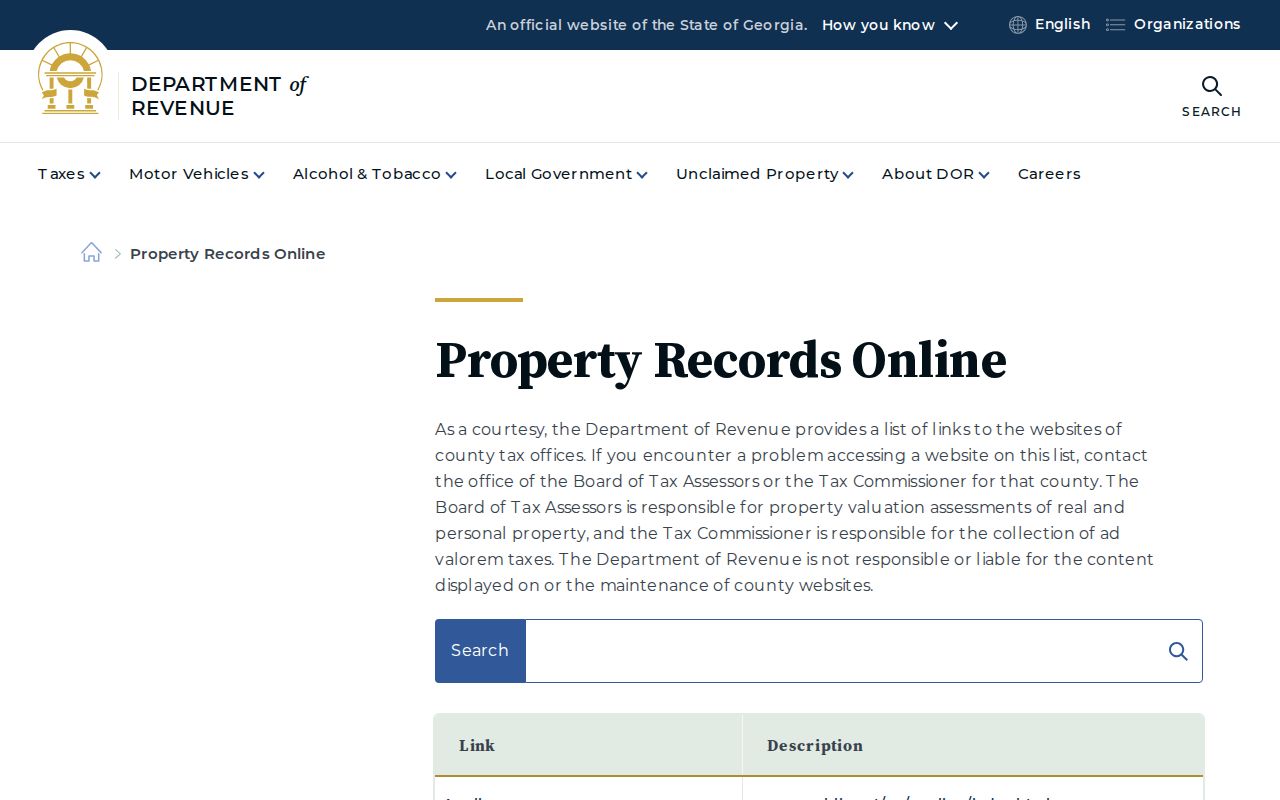
The directory screen hands you off to separate county systems. Search options and data coverage differ once you arrive.
Georgia Property Search Fields Vary by Portal
County assessor forms usually take an owner, an address, or a parcel key. But no single state label or format fits every county. GSCCCA runs its own form for deed-party and county searches. Keep the two portal roles distinct when planning a lookup. When you pick a county portal, follow that system's current labels. Do so for the best results.
| Portal / Field | Type | Required | What It Does |
|---|---|---|---|
| Assessor: Owner Name | Text | Usually optional | Finds tax-card matches; try entity and name variants. |
| Assessor: Location Address | Text | Usually optional | Finds a situs address; number, street, and municipality fields vary. |
| Assessor: Parcel / Property ID | Text | Usually optional | Matches a county-specific parcel or account key. |
| Assessor: Legal Description / Subdivision | Text or dropdown | Optional | Can help with lot, block, or older address questions. |
| GSCCCA: Party Type | Dropdown | No | Searches a party role; live option labels may vary. |
| GSCCCA: Instrument Type | Dropdown | No | Narrows to an available instrument class. |
| GSCCCA: County / Neighboring Counties | Dropdown and control | No | Sets county scope and may include nearby counties. |
| GSCCCA: Search Name | Text | For name mode | Individuals use last name, first name; entities use their name string. |
| GSCCCA: Date range | From / through | No | Limits record dates; compare results with the county's coverage dates. |
Do not mistake GSCCCA's broad name search for a universal address field. The assessor finds a parcel by situs. The deed index finds recorded parties and document references. Use both only after confirming the county and parcel.
Georgia Property Search on GSCCCA Has Limits
The Real Estate Index offers an optional property-search form for participating counties. It requires subdivision details. It also allows date and result-display controls. The service itself cautions that participation and county coverage dates vary. So treat it as a conditional tool, not a universal street-address box. Begin address work at the local assessor. Use the GSCCCA property search only when its county and subdivision conditions fit.
The GSCCCA optional property form displays the participation notice and each county's “good from/thru” control.
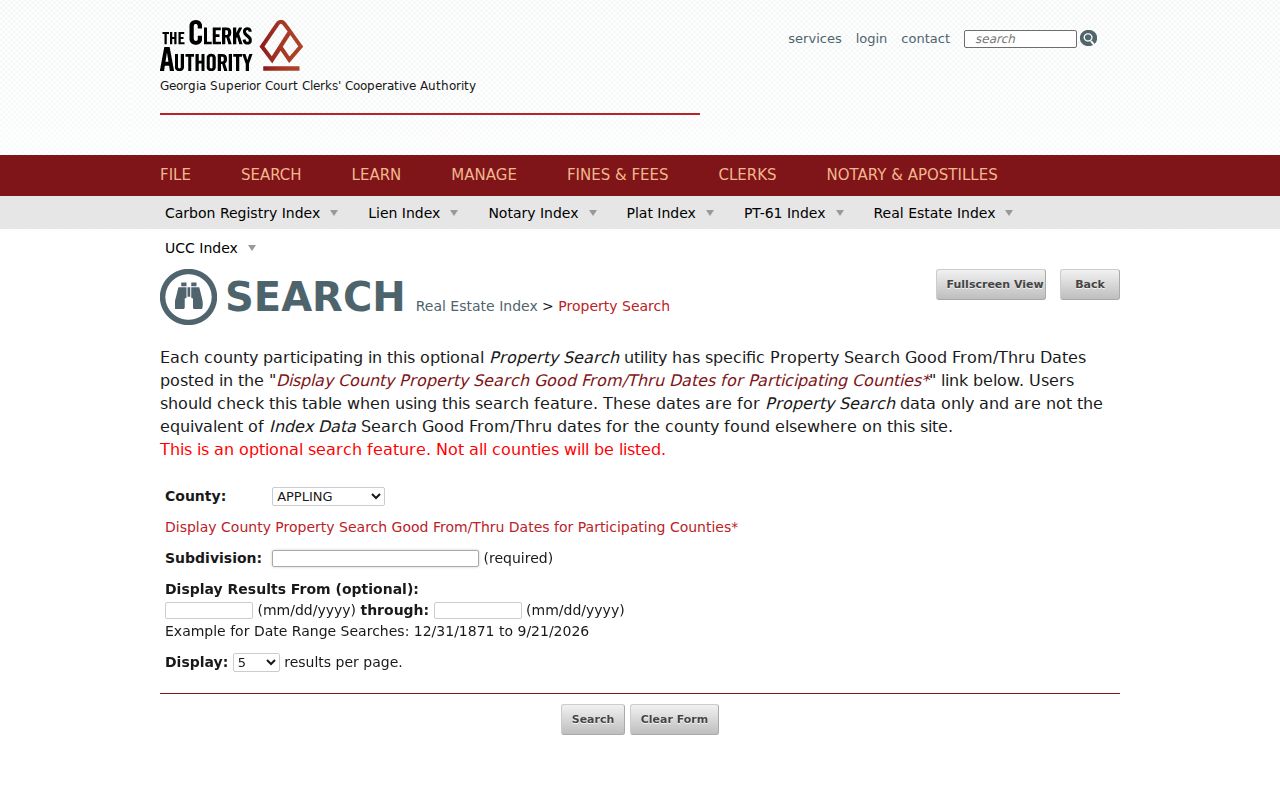
When a county is missing from the form or the address is outdated, go back to its assessor. The parcel's legal description serves as the bridge.
Fields in a Georgia Property Search Result
A property-search result is an inventory. It is not one authoritative statement on every part of a parcel. The county card may pair the owner of record with a mailing address, situs, and parcel ID. It may also include a legal description and current-year assessment. A GSCCCA result takes another shape. It names the parties, property location, instrument, recording date, and book/page reference. Read every field with its source and data date in mind.
| Owner label | Person, entity, trustee, or fiduciary name as displayed by the county card |
|---|---|
| Mailing address | Where the tax notice is sent; may be a representative, care-of, or out-of-county address |
| Situs address | Physical property location used for parcel and map searches |
| Parcel / account ID | County-specific key; preserve punctuation and any leading zeroes |
| Values and exemptions | Tax year, fair-market value, 40% assessed value, exemption indicators, and taxable value where shown |
| Legal description | Subdivision/lot/block, district or land lot, or metes-and-bounds reference |
| Deed index row | Party names, property location, instrument and recording date, book/page, image availability |
Some county portals add sketches, building traits, photos, or sale references. Others show none of these. A sale figure is recorded transaction evidence, not today's market value. The assessor's owner-field label and available years vary by county. Save the label and tax year beside each result.
- Situs address
- The physical location assigned to the parcel, separate from a postal city or tax mailing address.
- Parcel ID
- The exact county key that links an assessor card, map, and sometimes tax account.
- Owner of record
- The name shown by the chosen record system, not proof of every legal interest.
Date Fields in Georgia Property Search Results
A tax-card owner can trail a more recent deed. The assessor's roll and the clerk's index update on different schedules. The owner field belongs to the card's displayed data year. The deed index reflects recording and transmission. A map layer carries its own date too. Preserve the portal, county, tax year or recording date, and parcel ID. Later results then line up for a fair comparison.
The card and deed may name different parties. Check the deed image, legal description, and date before concluding anything. A name-only hit might be a same-name person, an entity variant, or a prior owner. The current card is a lead toward the recorded instrument. It is not the last word on the chain of title.
Address Fields in a Georgia Property Search
Enter the address exactly as you received it first. Then run a cleaner copy with punctuation, unit marks, or a hash sign stripped out. Did the county system accept it? Try expanding or shortening a directional next. A third version can swap in the postal city and ZIP. Street numbers shift over time, since annexation and local readdressing projects change them. Some older deeds carry no modern street address at all.
When the assessor returns nothing, search the street in county GIS instead. Inspect the address points there. Compare parcel geometry and road frontage to narrow the match. A ZIP or postal-city hit alone does not prove the property sits in that municipality or county. For an old parcel with no clear address, lean on its legal description, subdivision, lot and block, or a prior deed reference.
Keep Georgia Parcel IDs Exact
Copy the full parcel ID the moment a card shows it. Georgia has no statewide human-readable format for these keys. One county may say parcel ID, while another says map and parcel number, property ID, or account number. Some add separators or leading zeroes. Leave the punctuation intact. Never guess how a district or map component is encoded.
Use that exact ID across the assessor, county GIS, and tax system. The legal description and book/page reference then connect it to a recorded instrument. If the county split, merged, or renumbered parcels, keep both the current and prior IDs in your notes. A parcel number is a strong search key. Still, the deed's legal description confirms the land.
Check Georgia Owner Names in Context
Start people searches with the surname alone. Then try initials, middle names, former names, and spelling variants. For an LLC or corporation, use its legal name. The Georgia Secretary of State business record may reveal a control number. It may also offer an officer or registered-agent clue. That search identifies an entity and its filings, nothing more. It does not prove the entity owns a particular parcel.
Trusts can appear under a trustee, a shortened trust name, or a capacity label. Estates often linger on a tax card as "Estate of" or a fiduciary name. Match any name against county, mailing address, parcel geography, deed capacity, and legal description. A common name alone is not a reliable parcel match. For entity lookups, Georgia's Corporations Division search offers starts-with, contains, and exact-name options.
Choose a Georgia Property Search Key
Every search key solves a different piece of the lookup. An address works when the county keeps a current situs field. An owner name can pull up several parcels, or several people. A parcel ID is the best exact key once a match exists. Move from broad to exact. Find the county and address first. Confirm the parcel, then apply the owner or deed index only within the right geography.
| Search Key | Best For | Where It Works | Watch Out |
|---|---|---|---|
| Address | Locate one physical property | County assessor or GIS | Old addresses, postal cities, and county edges can mislead. |
| Owner name | Find possible parcels or recorded-party entries | Assessor and GSCCCA name search | Same names, trusts, LLCs, and stale tax-roll entries need context. |
| Parcel number | Match one county parcel across systems | Assessor, county GIS, tax system, some GSCCCA tools | Formats differ by county; preserve punctuation and zeroes. |
Not a title search. A Georgia property search gathers records from separate public systems; it does not guarantee clear title or replace a title professional's review of the instrument chain.
When a Georgia County Portal Is Missing
DOR notes that not every county publishes property records online. Call or visit the Board of Tax Assessors. Ask for the property card, parcel map, or assessment notice that already exists. Use the county contact listed through DOR's Property Records Online or the County Property Tax Facts directory. There is no statewide assessor number for a local parcel. Ask the Tax Commissioner separately for any bill, payment, or delinquency record.
Need a recorded deed or plat? Contact the Clerk of Superior Court. A written Georgia Open Records Act request works well for a card, map, or other public record. It covers material that is not online. Describe the county, the parcel ID or address, and the record type. Include the date range and your preferred electronic format. The Attorney General's Open Records guidance explains the process. An agency that cannot produce a record within three business days generally provides an estimate. It also cites any exemption basis. Search and redaction charges may apply after the first 15 minutes. Copying is generally capped at $0.25 per page under the agency's approved schedule.
Older material may live at the county courthouse or the public library. It may also sit at the Georgia Archives or the FamilySearch catalog. Request an existing record rather than a new title abstract or parcel analysis. For the recorded-document search sequence and image-copy options, see the Georgia deed-records page.